Monday, 8 January 2018

Load data using Data Flow in Oracle DV

This time I explore the inbuilt ETL feature called Data Flow in Oracle DV ( DVD in my case).

To start with first go to Data Sources and Create Data Flow.


It will prompt for Data Source. We can select a Data Source or alternatively we add a source by either clicking on the '+' icon on top to add data or 'Add Data' option on the lefthand side menu.


Now let me, explore the left-hand side menu. These are the basic ETL activities those we can perform.


I start with selecting Sample Order Lines excel as a source.


My objective is to load the Customer data into Customer dimension.


Therefore first I need to select the Customer columns, and I use 'Select Columns'.


And I select 'Customer ID', 'Customer Name', 'Customer Segment'.
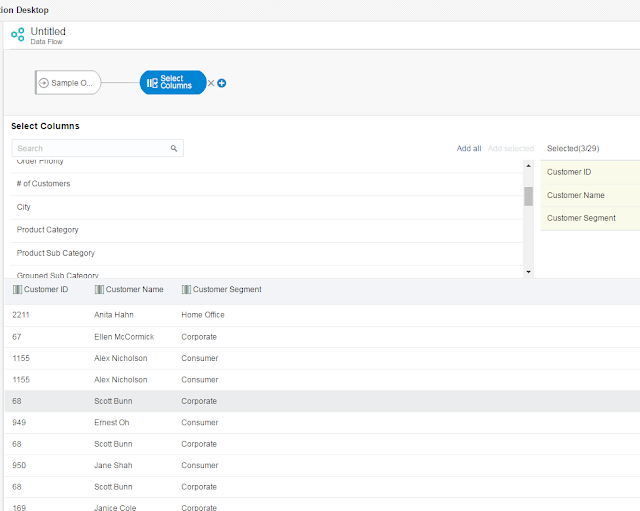

Next, I use 'Rename Columns' to match the target column names.


And now I define the target table.


I save and execute the Data Flow.


Now I open the table in DB and check the loaded data. It has loaded 9000 rows.


However, there is a problem. There are duplicate records. And as I have stated earlier my objective was to load data for Customer dimension. I need to get distinct rows only.


To do that, I have added one more column 'CUST_COUNT' which is nothing but 'Customer ID' only.


And I add aggregation 'Count' on CUST_COUNT.


I do not do any further change, and as I do not have any target column as CUST_COUNT, it is not going get loaded in the target. But by having an aggregation I am using group by other columns, and that in turn is eliminating the duplicate rows.


Now I truncate the target table and rerun the Data Flow, and this time the result is as desired.


There are multiple other options and we can use expressions also, which we might cover in a later post. 

Sunday, 31 December 2017

Level based Metrix - Content Level in OBIEE vs Fixed in Tableau

This is a continuation of my earlier post Level based Metrix - Content Level in OBIEE vs Exclude in Tableau , and I am going to focus on Fixed in Tableau.

To start with, I am creating a new calculation 'Company wise Revenue', which is the Sum of Revenue at the Company level of the Office hierarchy in the RPD BMM.


I add this column in an analysis in OBIEE. 


I am keeping all the 3 columns 
1. Revenue - Details level
2. Revenue (Sum for All Office) - Total level
3. Company wise Revenue - Company level


We can compare these 3 columns side by side and can onserve how the 'Company wise Revenue' is summing up at Company level.

Next I calculate the same in Tableau using 'Fixed' expression, at Company level of the Office hierarchy in Tableau (for the hierachy refer to Level based Metrix - Content Level in OBIEE vs Exclude in Tableau ). 

And I test that column along with 'Revenue' and 'Revenue Exclude'.


The output is same as we have seen in OBIEE.

Can we open file created in Tableau Desktop in Tableau Public

I am relatively new to Tableau. I have created some TWBX file using tableau, and now I have a question, what happens once my license expires? by any means can I still open/work on those files?

And that brings me to this post.

I am using one of the TWBX files which I have created earlier, and I can open and use it using Tableau Desktop.


However, if I try to open the same file in Tableau Public, it is not allowing me.


Now I select 'Save to Tableau Public' from Server → Tableau Public.


And log into to my Tableau Public profile.


And publish this workbook.


Next I go to my Tableau Public profile and download the uploaded file in TWBX format.

Now I open Tableau Public client, I have 2 options to open the file.
1. Open - I can open the TWBX file I have downloaded.
2. Open from Tableau Public - I can directly open the file from my profile.


The file works fine in Tableau Public client.


However, if I do any change and want to save it, the only option is in Tableau Public.

Saturday, 30 December 2017

Level based Metrix - Content Level in OBIEE vs Exclude in Tableau

In this post, my objective is to showcase Level based Metrix in using Content Level OBIEE vs Exclude in Tableau. However, I am not going to get into which one is better or worse. This more of exploring options in OBIEE and Tableau to reach to get the same result.

Level Based Matrix - We create a hierarchy of dimensions in reporting solutions and built Calculations / Metrics associated with a specific level. Examples of such calculations are Monthly Sales, Quarterly expense, Country wise revenue etc.

I am using 1 fact and 1 dimension. First, let me do it in OBIEE. I have created the joins in the physical layer.
I have brought those 2 tables in the BMM.

And created logical dimension/hierarchy for Dim - Office.


In the Fact - Revenue, I have kept the content level for Dim - Office at the details level like usual. 


I have 2 Revenue columns, 'Revenue', and 'Revenue (Sum for All Offices)'. Revenue is a straightforward logical column with aggregation as SUM, and Level not defined separately.

However, Revenue (Sum for All Offices) has level defined at the total level of Office. 


I test both the columns and the result is as desired.


Now it is time to replicate the same in Tableau. I have added those 2 tables and joined them.


Next, I have created Office hierarchy, and duplicated 'Revenue' as 'Revenue Exclude'. 


And I have used 'Exclude' expression, and have excluded all the levels of Office hierarchy.  


I test it 'Revenue', and 'Revenue Exclude' in a report. The output is same as we have seen in OBIEE.


There are 2 more expressions 'Include' and 'Fixed' in Tableau, which are also used for the same purpose. I will try to explore them on the next blog.

Using Driving table in OBIEE Complex Join

In OBIEE we can join tables present in different Schema and Connection Pool. However there is a possibility of performance issue in such case. Using Driving Table can be solution for that. 

In this blog I am going to demonstrate how we can use Driving Table, and what is the impact of it.

To start with I am using the fact SAMP_REVENUE_F from BISAMPLE schema. 


I am going to join it with SAMP_OFFICE_D in the same schema


And EMP_D which is present in a different schema. 


The concept of Driving table is useful specifically if we are joining 2 tables which are in different schema and one of them has less number of rows.

I am using 2 dimensions one present in the same schema and another in different schema to showcase the difference in join.

Next I have imported all 3 into the physical layer and joined them.


Next I create a BMM and put them into it and create logical fact and dimension tables. 


The Logical / Complex join between Fact - Revenue and Dim - Office is like a usual Logical / Complex join in BMM.


To showcase the difference in query with / without Driving table first I am doing the Complex join between Fact - Revenue and Dim - Employee is like a usual Logical / Complex join in BMM. 


Let me create a simple report to test it out.


In the session log we can see 2 different SQL queries have been fired for 2 different schema which have no connection in between.

Now let me define the Driving Table in the complex join. As in this case EMP_D has less number of rows, I am using it as the Driving Table.


And in the back end SQL query we can find a additional in statement using parameters.


And this makes the difference in performance.

Thursday, 30 November 2017

Get Query Log for in Oracle BI Publisher

Is it possible to show a line graph having 2 lines in the same graph. One profit line for a selected store and other profit line as the average of the remaining 9 store. 

Facing ORA-01033 / ORA-01157 while trying to run RCU for OBIEE installation

The OBIEE 11g instance in my local has got corrupted and I was trying to reinstall it. In the process, I was required to recreate the DEV_BIPLATFORM and DEV_MDS schema (DEV4_BIPLATFORM and DEV4_MDS in my case).

Before running the RCU for creating new schemas, I had gone to the DB and have dropped the schemas. Point to be noted I have not dropped them using RCU rather I have manually dropped them using SQL Developer.

As there is a shortage of space in my local, I thought of deleting the DBF files also.


And I have done Shift + Delete these 2 files.

Now when I try to log in the RCU using my SYS account, I am facing error 'ORACLE initialization or shutdown in progress'.

I have tried to connect to the SYS account using SQL Developer and facing the same error 'ORA-01033: ORACLE initialization or shutdown in progress'.


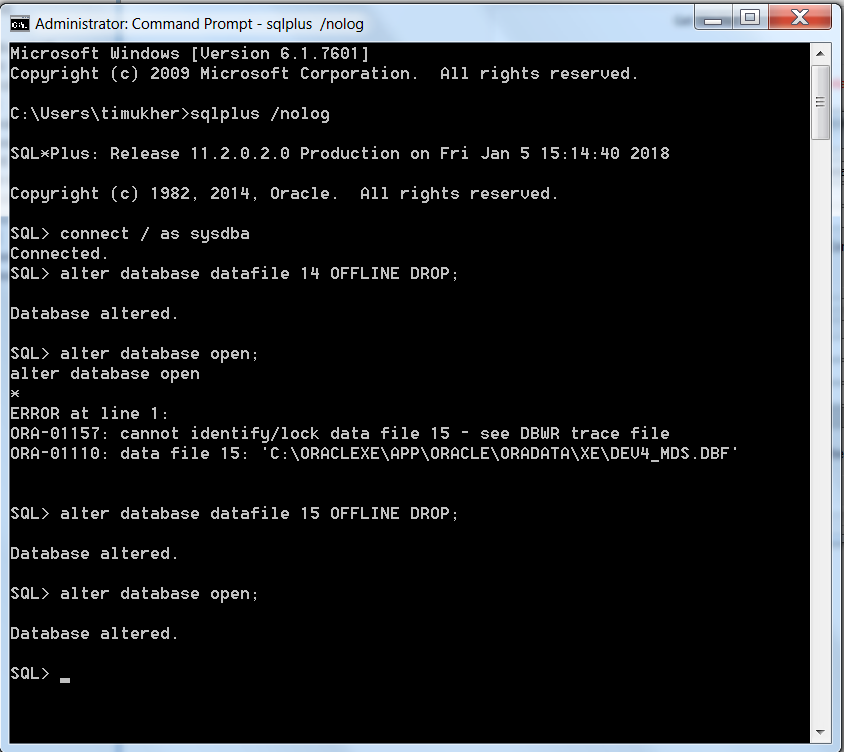
As I am unable to log in to the DB SYS account, I try to log in to SQLPLUS using the command prompt as '/'. And this time I am successful.

Now I try to alter the DB open (alter database open), and that revealed that Oracle can't identify/ lock data file 14 and 15.

A bit of googling revealed that it is due to deleting those 2 DBF files from the Oracle folder. The DB is unable to start completely as it is still looking for those 2 files.

Oracle docs note this on the ORA-01157 error:

ORA-01157: cannot identify/lock data file string - see DBWR trace file

Cause: The background process was either unable to find one of the data files or failed to lock it because the file was already in use.

The database will prohibit access to this file but other files will be unaffected. However, the first instance to open the database will need to access all online data files. Accompanying error from the operating system describes why the file could not be identified.

Action: Have operating system makefile available to the database. Then either open the database or do ALTER SYSTEM CHECK DATAFILES.


Obviously, I have made a mistake by deleting those 2 files manually, and now I am unable to use my DB. Now, what could be the resolution ?

There could be different ways out, including restoring the files. But I do not have the files and I want a quick and easy solution.

I run the command 'alter database datafile 14 OFFLINE DROP' (and for datafile 15 also).  And it alters the DB.

Next, I try to run 'alter database open' once again, and I this time I was successful. And these steps do the magic and resolves my problem with RCU, and puts me back on track for OBIEE installation.

Implementing & Testing Row Level Security in Power BI

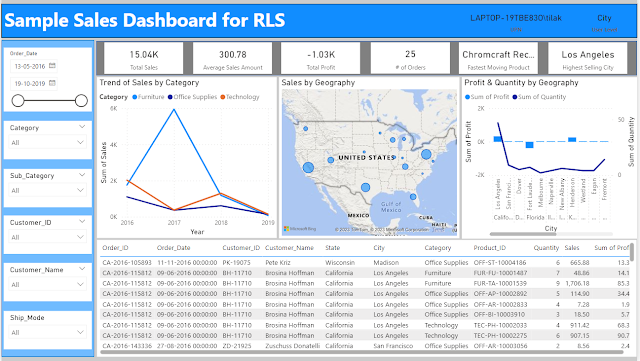
I have suffered a great deal of pain while implementing and more so while validating Row Level Security in Power BI. Let me try to capture a...